IP address or port not externally accessible → very often, if your node’s dashboard shows an error / connection problem it is because your node is not actually externally accessible. This is not a Diode issue per se, it is more of a system/network configuration issue. Whereas a “virtual machine” in a data center will nearly always work (as long as your firewall rules are open), a box in your house will ALWAYS require router configuration. And, even if you correctly configure your router, your ISP still may not allow inbound connections. So, you may be stuck. Read on to get some tips.
If your ISP does allow inbound connections, then it will just be a process of port forwarding through your router. Here is an example of someone who sorted that out in Brazil with a ZTE router. Also, if you are running the node in a virtual environment (e.g. docker, wsl, etc…) on your box, then you may also have to make sure that virtual environment is allowing communications in.
Here are some tips for how to test if your machine is accessible to the open world:
-
go to your node’s dashboard - e.g. Diode™ Network
-
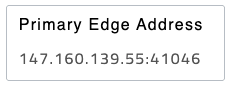
find the Primary Edge Address box - that is where other nodes will try to find your node and route data to it. It looks like:
-
Copy the IP address and port there
-
In a terminal window on Mac or Linux (or Windows if you have the right tools), type:
curl -v telnet://147.160.139.55:41046
You should get back something like:

-
Do this for any port that the dashboard is warning you that it can’t connect to
NOTE: You can also use tools like ping, nc (netcat), or nmap to try to connect. e.g.:
Use ping to see if the server is alive (however, sometimes servers or ISPs block pings):
> ping 147.160.139.55
PING 147.160.139.55 (147.160.139.55): 56 data bytes
64 bytes from 147.160.139.55: icmp_seq=0 ttl=52 time=68.893 ms
Use netcat to test a particular port:
> nc -zv -w 5 147.160.139.55 41046
Connection to 147.160.139.55 port 41046 [tcp/*] succeeded!
Use nmap to scan a range of ports:
> nmap 147.160.139.55 -p 1-1000
Starting Nmap 7.95 ( https://nmap.org ) at 2025-04-18 11:02 PDT
Nmap scan report for 147.160.139.55
Host is up (0.061s latency).
Not shown: 990 closed tcp ports (conn-refused)
PORT    STATE    SERVICE
22/tcp  open     ssh
25/tcp  filtered smtp
135/tcp filtered msrpc
136/tcp filtered profile
137/tcp filtered netbios-ns
138/tcp filtered netbios-dgm
139/tcp filtered netbios-ssn
443/tcp open     https
445/tcp filtered microsoft-ds
993/tcp open     imaps